
Hello CraftyIreland friends! This week’s ‘How To’ is going to focus on building a mailing list, in order to build relationships with
existing valued customers and
prospects through email newsletters (
eNewsletters).
Existing valued customers: These are the people who have bought your creations, and they are incredibly valuable to your business. By using an eNewsletter to build a relationship with a customer you can not only receive repeat business, but also referrals. As the saying goes
‘It's easier to keep a client than find a new one.’Prospects: A prospect is marketing speak for a potential customer. We meet people (whether online or in person) every day who are prospects and it can take a bit of time and relationship building before they are ready to become a customer.
Building long-term relationships with customers is
essential for small businesses like ours and sending an eNewsletter is a great way to do this, in order to convert a prospect into a customer; as well as getting repeat business and referrals.
Important note: it’s really important to get a person’s permission BEFORE you add them to your mailing list.
Building your mailing listThis is a continual process, and it’s pretty easy to do (although it can be slow going):
1. If you sell your creations at markets you could have a
mailing list sign-up form at your stall/table for visitors to fill in.
2. When you make a sale on Etsy, you can include a question in your
‘thank  you’ convo
 along the lines of
‘... I send an email to my customers once a month, with information about special offers - would you like to receive it?’ 3. If you plan on sending eNewsletters via one of the many
email marketing providers that are out there (more of which later) an
online sign-up form is usually included, which you can link to from your Etsy shop; Facebook; blog; personal website etc.
4. Make sure you capture details such as: first name, surname, email address, country, date of sign up, where they signed up and whether they are a ‘prospect’ or ‘existing valued customer’.
Managing your mailing list1. You can manage your mailing list in
Excel (or similar spreadsheet software) or as a ‘
group’ in your email provider (Outlook, Gmail, Hotmail etc). There are also database systems available to purchase, but in the early stages a spreadsheet should suffice.
2. You can choose to
segment your list into groups, if you want to send different information to different people (for example: to people in different countries, customers vs prospects) - this is why it’s important to capture as much information as possible at the sign-up stage. Segmenting becomes more important as your mailing list grows, therefore initially it may make sense to send the same email to everyone on the list.
3. Keep your mailing list
up-to-date: if you get a returned email (known as a
‘bounce back’) due to an incorrect email address, then remove that email address from the list; if someone requests to be
‘unsubscribed’ (to not receive future emails) it’s important to respect this and update your list accordingly and in a timely manner. If you use an email marketing provider for your eNewsletter they will most likely have an auto-unsubscribe function built into their system, which will manage this for you (however you should cross-check this against your spreadsheet in the event of changing email providers in the future).
Creating an eNewsletter1. You can create an eNewsletter using the
regular email provider that you use for your business (in which case the newsletter will be a
basic text email with some links and most likely no images) or through an
email marketing provider (in which case the newsletter will be created using a HTML template and will be available as a
HTML or text email, and can contain images, links and your shop’s branding)
2. If you choose the latter then you will need to do a bit of research to find an
email marketing provider that will meet your needs (google ‘email marketing’ and you will find a long list of providers). There are lots of them out there and some charge for the creation of an eNewsletter template and to send emails. There are free providers out there though, such as
Mail Chimp, who I discovered a few months ago through the Etsy forums. With
Mail Chimp you can brand the eNewsletter template with your shop banner, add images and (best of all!) you don’t need to have any HTML knowledge to create the email.
3. It’s a good idea to put a
schedule in place for when you are going to send your eNewsletter - if you’ve asked people to sign up to receive one then you need to commit to sending it on around about the same date each month (or week/fortnight depending on the frequency you have decided on) - this is important in building that relationship with your prospects and valued customers.
4. The
content of your eNewsletter could include: introduction to new items in your shop; an exclusive competition or discount for subscribers; an article from your blog; a survey to ask what your customers would like to see more of in your shop (some email providers offer easy to use surveys with their eNewsletters) etc. Try and put some of your personality into the content & remember that you’re trying to build a relationship with the recipient, so keep it interesting and relevant: the recipients signed up to receive updates on your shop and creations, so it’s a good idea to keep the content focused around that.
5. Privacy: If you are using your regular email provider to send your eNewsletter as a 'group' email it is essential that you put the people on your mailing list's email addresses into the 'bcc' (blind copy) address line - you would be breaching a person's privacy by exposing their email address to other recipients.
6. Personalisation: One of the benefits of using an email marketing provider is that you can easily personalise subject lines and 'to' lines with the recipient's name, which is a nice touch.
7. Spell-check and testing: It is so important that your content is professional looking, and checking for spelling, punctuation and formatting errors is essential. Before you send your eNewsletter print it out to proof read it (and ideally get someone else to proof it also) and send a copy of it to your own email to test the functionality and appearance of it: check the email subject line, content, images (are they appearing correctly), links (are they all linking to the correct location?), formatting (is everything aligned correctly?)
If you have any questions about this article please feel free to
contact me.
Judith ♥
A Box For My Treasure

 Hi guys,
 Here's Ger at work on one of our "coquette" scarves, I'm a little camera shy so poor Ger ends up in most of the pics! lol
 The walls of the studio are adorned with antiquated bits and bobs, I like to collect trinkets and flippery and create a nice environment to work in, we feel a bit more inspired if the area is full of interesting bits and bobs.


 I love to find objects or pieces of furniture and do them up to suit the space. Both of the french looking dressers here were finds that have been shabby chic'd up to suit the studio decor. The taller dresser is covered in vintage pattern paper to give it an antique look. I really enjoy the freedom in the studio to do whatever one wants! Not sure I would get away with that kind of tom foolery in my house aswell! lol


 For centuries natural dyes have been extracted from roots, stems, leaves, berries and flowers as well as from shell fish and insects and often the formulae were closely guarded secrets handed down through families. One of the most prolific dye sources are lichens which are plant organisms made up of fungus and algae and are usually grey, green or yellow in colour. Traditionally it was the childrens job, after a shower of rain, to collect the wet lichens and, as it was thought to be unlucky for any man to touch the dye pot, only women would dye the wool and cloth.
 The skeins are then rinced gently and put outside on the wall to dry in the sun. Further skeins of wool can be added to the pot, undergo the same process and each will come out a lighter shade of orange/yellow. The results are amazing.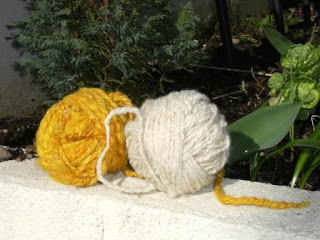
 As always I welcome any comments on this article and ideas for future explorations. If you are a crafter who would like to be linked to any of the series of articles please let me know.


